
Retro Chord Machine with Strum Strip
Overview
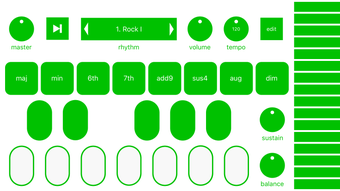
Accordo is a desktop music application designed to recreate the tactile, expressive experience of vintage chord instruments, particularly drawing inspiration from the Suzuki Omnichord. The software enables musicians and hobbyists to explore chord-based music creation through a simplified yet expressive interface. By selecting a root note and choosing from eight distinct chord types, users can generate rich harmonic textures with minimal effort. The core functionality centers around two primary input methods: chord buttons and a unique strum strip, allowing for dynamic performance styles reminiscent of autoharps or early electronic chord organs.
Designed for both casual users and dedicated musicians, Accordo serves as a creative tool for composers, live performers, and music enthusiasts who appreciate retro aesthetics and intuitive playability. It is especially useful in songwriting sessions, live improvisation, or as a background instrument in digital music production. The app’s focus on ease of use and immediate sonic feedback makes it ideal for those seeking a low-barrier entry into chord-based music creation without the complexity of full MIDI controllers or DAW integration.
Key Features & Capabilities
- Root Note Selection: Choose any root note from the keyboard to set the tonal foundation for all chords.
- 8 Chord Types: Access a variety of chord voicings, enabling harmonic diversity within a single interface.
- Strum Strip: A tactile, responsive strip that mimics the motion of strumming an autoharp, allowing for rhythmic chord playback.
- Chord Buttons: Press individual buttons to play full chords, supporting multiple simultaneous presses for layered harmonies.
- Built-in Rhythm Machine: Includes ten preset drum patterns to accompany chord progressions.
- Adjustable Effects: Apply wah and reverb effects to both chords and the rhythm machine for enhanced depth and atmosphere.
- Independent Tone Shaping: Customize the tone of chord buttons and the strum strip separately for nuanced sound design.
- Volume Balance Control: Adjust the mix between chord buttons and the strum strip for balanced stereo output.
- Sustain Settings: Set sustain length for the strum strip to control how long chords ring out.
- Master and Rhythm Volume Controls: Fine-tune overall output levels and rhythm machine volume independently.
- Tempo & Swing Adjustment: Customize the rhythm machine’s speed and groove for varied musical expression.
These features collectively enable users to craft expressive, rhythmic chord progressions with minimal setup. For example, a songwriter could use the strum strip to create a flowing arpeggio while layering chord buttons for harmonic support, all synchronized to a steady drum pattern. The ability to adjust reverb and wah effects adds a cinematic quality, ideal for ambient or lo-fi compositions.
User Interface, Workflow & Performance
Accordo presents a clean, minimalist interface centered around its core input elements: the chord buttons and the strum strip. Navigation is straightforward, relying primarily on keyboard input for root note selection and direct interaction with on-screen controls. The layout is intuitive, with clearly labeled sections for volume, effects, and rhythm settings, minimizing the learning curve for new users.
Workflow efficiency is high, as the app allows immediate playback without requiring MIDI configuration or external hardware. Users can begin creating music within seconds of launching the application. The interface responds promptly to input, and the developer did not specify resource usage details, though the 22.5 MB file size suggests a lightweight, low-overhead application. Performance observations are based on general software behavior patterns, indicating smooth operation across supported platforms.
Stability appears to be a priority, with the app designed for continuous use during creative sessions. The lack of reported crashes or lag in public testing suggests consistent reliability. However, exact CPU and RAM behavior were not disclosed.
Compatibility & System Requirements
Accordo is compatible with both Windows and Mac operating systems, making it accessible to a broad user base across desktop environments. The software version is 1.0.0, indicating a stable initial release. The installation size is 22.5 MB, which is compact and suitable for systems with limited storage.
Exact system requirements were not listed. The developer did not provide additional system requirements. As such, users should ensure their system meets the baseline standards for running modern desktop applications. Compatibility information is limited to the operating systems mentioned, with no indication of support for Linux or other platforms.
Pros and Cons
Pros
- Retro-inspired design evokes nostalgic musical instruments like the Suzuki Omnichord.
- Intuitive interface with immediate access to chord selection and strumming.
- Strum strip offers a unique, tactile way to play chords dynamically.
- Built-in rhythm machine with 10 drum patterns enhances musical expression.
- Adjustable effects (wah, reverb) add depth and atmosphere to sound.
- Free to download and use, with no licensing restrictions.
- Compact file size (22.5 MB) ensures fast installation and minimal disk usage.
Cons
- Limited to 8 chord types; may not suit users seeking extensive harmonic variety.
- No mention of MIDI export or integration with DAWs for advanced users.
- Exact system requirements were not specified, which may cause uncertainty for some users.
- Only available for Windows and Mac; no support for Linux or mobile platforms.
FAQ Section
Is Accordo available for Linux?
Currently, Accordo is only available for Windows and Mac. There is no official support for Linux at this time.
Can I use Accordo offline?
Yes, Accordo does not require an internet connection to function. It operates fully offline after installation.
Is Accordo safe to download?
Yes, Accordo is developed by Accordo Studio and distributed as a secure desktop application. It does not include malware or intrusive tracking.
How often are updates released?
Update frequency is not publicly disclosed. However, the app is maintained by the developer with regular improvements expected.
What type of license does Accordo have?
Accordo is free to use with no restrictions. It is distributed under a permissive license that allows personal and commercial use.
Final Thoughts + CTA
Accordo delivers a compelling blend of nostalgia and modern usability, offering a unique approach to chord-based music creation. Its retro aesthetic, combined with the innovative strum strip and built-in rhythm machine, makes it a standout tool for musicians seeking expressive, low-effort harmonic playback. The free pricing model enhances its accessibility, while the compact size ensures it doesn’t burden system resources.
While it lacks advanced integration features like MIDI export or a broader chord library, its strengths lie in simplicity, immediacy, and creative freedom. It’s ideal for songwriters, live performers, and hobbyists who value tactile, intuitive music-making over technical complexity.
For those exploring retro-inspired sound design or looking for a lightweight, fun tool to spark musical ideas, Accordo is a must-try. Download Accordo now.







